Writing / 6 September 2026
Compressing imageswithout uploading them.
How SnapWap runs six image codecs inside the browser, keeps the page responsive while it does, and what I got wrong the first time.
Most image compressors on the web work the same way: you upload the photo, a server shrinks it, you download the result. That is fine for a holiday picture. It is less fine for a product screenshot that has not launched, a scanned contract, or anything with a face in it. The file leaves your machine, and you are trusting a company you have never heard of to delete it.
SnapWap is my answer to that. It compresses, converts and compares images entirely inside your browser. There is no upload button because there is nothing to upload to. You drop a file, pick a format, drag a quality slider, watch the original and the result side by side, and download. The whole thing runs on your own device.
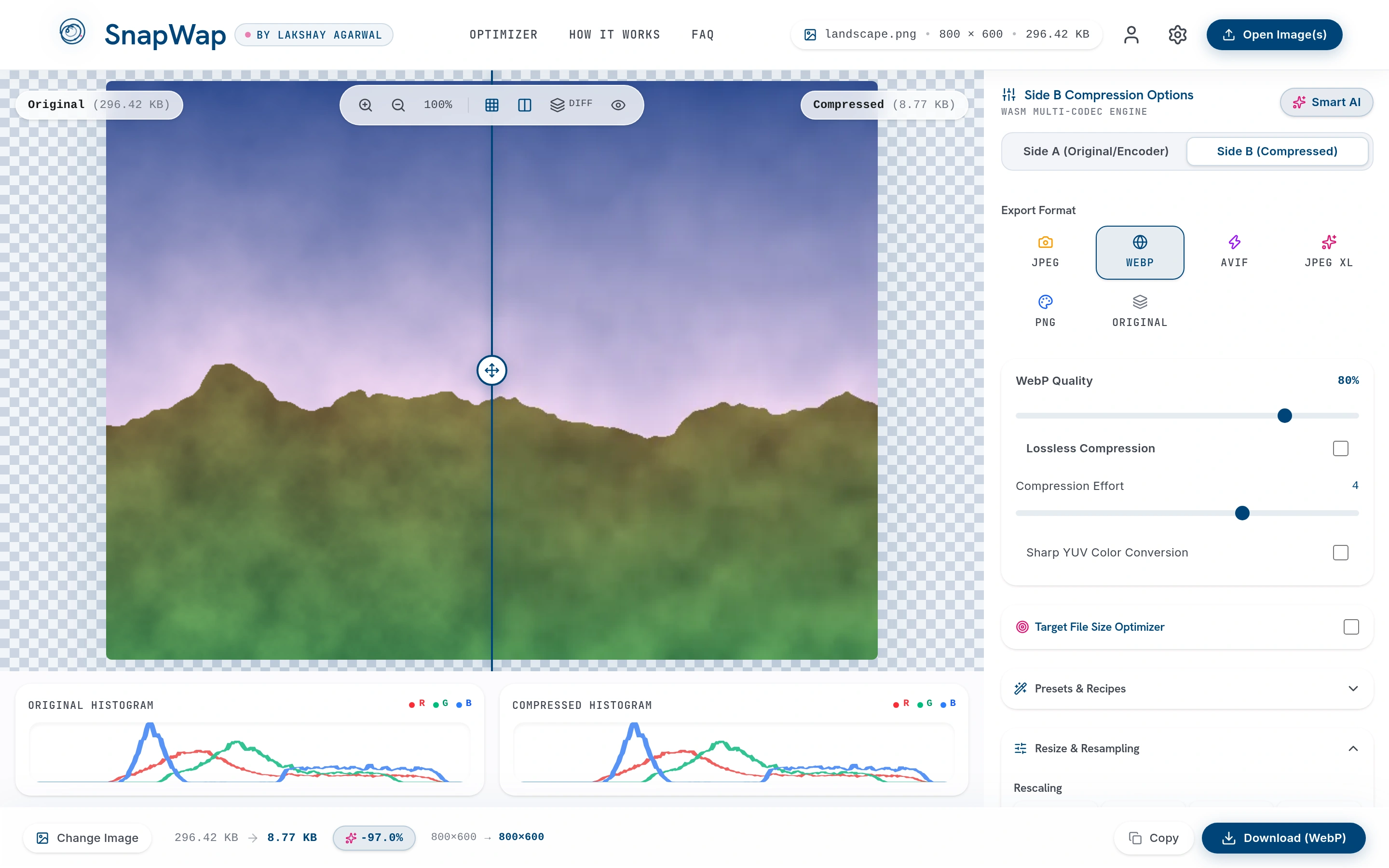
What it can do
- Convert between JPEG, WebP, AVIF, JPEG XL and PNG, and reduce a PNG to a small colour palette when that is what the image needs.
- Show the original and the compressed version side by side, with a draggable divider, a difference view that highlights where detail was lost, and a colour histogram for each.
- Hit an exact file size. Type "under 100 KB" and it finds the best quality that fits.
- Batch. Drop twenty files, get one ZIP back.
In the screenshot above, a 296 KB landscape photo came out at 8.77 KB as WebP at quality 80. That is 97% smaller, and you cannot tell the difference at normal size.
How it stays fast without a server
The interesting engineering problem is not compression itself. The compressors are well-known open source codecs, the same ones used by browsers and phone cameras, compiled to WebAssembly so they can run in a web page at close to native speed. The problem is keeping the page responsive while they run.
An AVIF encode of a large photo can take several seconds. If that ran on the same thread that draws the page, every slider would freeze until the encoder finished. So the encoders live in a background worker, and the page only ever sends it work and waits for answers.
The second problem is what happens when you drag a slider. Dragging fires dozens of changes a second. If each one started a full encode, the worker would be buried under sixty jobs and you would see results arrive in the wrong order. SnapWap gives every request a sequence number. When a new request arrives, anything older is cancelled, whether it is still queued or already running. You always see the result for the latest position of the slider, never a stale one.
The engineering version
Two debounced lanes feed the worker: a 40ms preview lane that runs a low-effort encode for instant feedback, and a 300ms final lane that runs the real one. Each request carries an incrementing sequence ID; the worker throws a SupersededError for anything older than the newest ID it has seen. Pixel buffers cross the thread boundary as transferables, so a 29-megapixel image is handed over rather than copied. When brightness, contrast and sharpening are all at their defaults the preprocessing pass is skipped entirely, which is the common case.
Hitting an exact size
Marketplaces, forms and CMSs all have upload limits, and the usual way to meet one is to drag a slider, check the size, drag again. SnapWap's target-size mode does that search for you. It tries the middle quality, sees whether the result fits, and halves the range each time, so it needs at most seven encodes to land on the best quality under the limit. If even the lowest quality is still too big, it scales the image down a step and searches again.
What I got wrong the first time
The first release felt slow, and the tempting explanation was that image work needs a GPU. It does not. These codecs are serial, CPU-bound entropy coders, and no amount of graphics hardware changes that. The real cause was duller: I had shipped the baseline builds of every codec, without the vector-instruction and multi-threaded variants that exist for most of them. I only found that out by comparing the checksums of the files I was serving against the upstream builds.
The fix was to swap in the faster builds where they exist. The lesson was about claims, not codecs. It is very easy to write "120 fps" or "3x faster" on a landing page. I now keep a note in the repo of what has actually been measured and what has not, and nothing goes on the page from the second list.
Why it is GPL
The best palette quantizer available is licensed under the GPL. Serving that code to a browser counts as distributing it, which means the product that contains it has to be GPL too. I could have used a worse quantizer and kept the code closed. I chose the better one, licensed SnapWap as GPL-3.0, wrote the reasoning into the README, and built the quantizer behind an interface so a permissive replacement can be dropped in later without touching the rest of the app. Trade-offs like that are the job. The important part is making them on purpose and writing them down.
SnapWap is live at snapwap.lakshay.fyi. If you are building something that handles people's files and want it to earn their trust the same way, email me.